
Artificial intelligence is becoming an increasingly useful part of modern education. Students can now use AI tools to understand difficult subjects, organize notes, research topics, practice questions, improve writing, and manage their study time.
However, there are hundreds of AI tools available, and choosing the right ones can be confusing.
The good news is that you do not need dozens of tools. A small collection of useful AI tools can cover most student needs, from studying and writing to research and productivity.
In this guide, we will explore the best AI tools for students in 2026, what each tool can help you with, and how to use AI responsibly for education.
What Are AI Tools for Students?
AI tools for students are applications that use artificial intelligence to assist with learning, studying, research, writing, organization, and other academic tasks.
Students can use AI tools to:
- Understand difficult concepts
- Summarize information
- Create study notes
- Generate practice questions
- Research topics
- Improve writing
- Organize assignments
- Create presentations
- Manage study schedules
- Practice languages
The purpose should be to make learning more effective—not to avoid learning.
Best AI Tools for Students
Here are 15 types of AI-powered tools that students can consider for different academic needs.
1. ChatGPT
ChatGPT can be used as a general-purpose AI study assistant.
Students can use it to:
- Explain difficult concepts
- Create study plans
- Generate practice questions
- Brainstorm ideas
- Summarize notes
- Practice conversations
- Review writing
- Create flashcards
For example, instead of asking for the answer to a math problem, you can ask ChatGPT to guide you through the solution step by step.
This encourages understanding rather than simply copying an answer.
2. Google Gemini
Google Gemini can assist students with research, brainstorming, explanations, writing, and general learning tasks.
You can use it to explore a topic, ask follow-up questions, create study material, or break a complicated concept into simpler sections.
As with any AI system, important academic information should be verified using reliable sources.
3. Microsoft Copilot
Microsoft Copilot can be useful for students who regularly work with Microsoft’s productivity ecosystem.
Depending on the available features, AI assistance can support tasks involving:
- Writing
- Brainstorming
- Information organization
- Documents
- Presentations
- Productivity
It can be especially useful when AI assistance is part of the tools you already use for school or college work.
4. Grammarly
Grammarly is useful for improving written communication.
Students can use it to identify issues involving:
- Grammar
- Spelling
- Clarity
- Sentence structure
- Tone
- Word choice
It can be helpful when reviewing essays, emails, reports, and other academic writing.
However, students should understand the suggested changes rather than accepting every recommendation automatically.
5. Canva AI
Canva can help students create visual content and presentations.
Students can use it for:
- Presentations
- Infographics
- Posters
- Study graphics
- Social media-style educational content
- Visual summaries
AI-powered features can speed up parts of the design process, making it easier for beginners to create professional-looking educational materials.
6. Perplexity
Perplexity can be useful for research and exploring questions.
It provides answers with sources, which can make it useful as a starting point when researching a topic.
Students should still open and evaluate the original sources rather than relying entirely on an AI-generated summary.
This is particularly important for academic assignments and research papers.
7. Notion AI
Notion AI can help students organize information and manage their study workflow.
You can use it to organize:
- Class notes
- Assignment lists
- Project plans
- Study schedules
- Research notes
- To-do lists
Students who already use Notion for organization may find AI features useful for turning scattered information into a more structured system.
8. Quizlet
Quizlet is popular for learning and reviewing information through flashcards and quizzes.
AI-powered features can help students create or interact with study materials more efficiently.
It can be useful for:
- Vocabulary
- Definitions
- Important facts
- Exam revision
- Language learning
Flashcards are especially useful when you need to repeatedly recall information.
9. Wolfram|Alpha
Wolfram|Alpha is designed for computational and knowledge-based queries.
It can be useful for students working with:
- Mathematics
- Statistics
- Science
- Engineering
- Calculations
Students should use computational tools to understand the process, not simply copy the final result.
For mathematics in particular, try solving the problem yourself first and then use the tool to check your work.
10. Otter.ai
Otter.ai can help with transcribing spoken conversations and meetings.
For students, this type of tool can potentially help organize information from lectures, discussions, interviews, or study sessions, depending on the context and applicable rules.
Always make sure recording or transcribing a class is permitted by your school, university, teacher, and local rules.
11. Elicit
Elicit is designed to assist with academic research and finding relevant research literature.
It can help students explore research questions and organize information from academic papers.
This can be particularly useful for:
- Research projects
- Literature reviews
- Academic exploration
- Finding relevant papers
Students should read the original research rather than relying only on AI-generated summaries.
12. QuillBot
QuillBot provides writing and paraphrasing assistance.
Students may use it to:
- Improve sentence structure
- Explore alternative wording
- Summarize text
- Review writing
However, paraphrasing tools should not be used to disguise copied material or bypass academic integrity requirements.
Always follow your institution’s rules about AI-assisted writing.
13. DeepL
DeepL can be useful for translation and language-related tasks.
lass=”yoast-text-mark” />>Students learning another language can use translation tools to understand unfamiliar words and sentences.
>However, machine translation should be treated as assistance rather than a perfect replacement for human understanding.
>For language learning, try studying why a particular translation works instead of simply copying it.
14. Adobe Firefly
Adobe Firefly can help students create visual content using generative AI features.
It may be useful for:
- Presentation graphics
- Concept visuals
- Creative projects
- Illustrations
- Design experiments
Students working on creative assignments should check their institution’s requirements concerning AI-generated content.
15. AI Presentation Tools
AI presentation tools can help students turn ideas or structured information into presentation drafts.
They can potentially assist with:
- Slide structure
- Design ideas</p>
- Content organization
- Visual suggestions
But students should review every slide and make sure the information is accurate and appropriate for the assignment.
How to Choose the Best AI Tool for Student
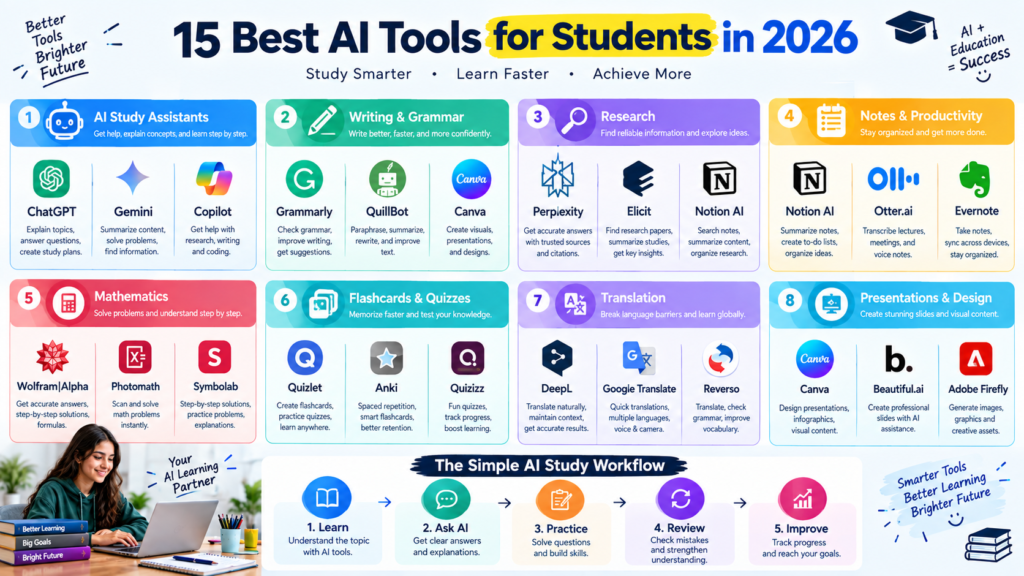
There is no single AI tool that is perfect for every student. The right tool depends on what you need help with.
Consider your main purpose before choosing a tool.
>For studying: Use AI assistants, flashcard tools, and quiz platforms.
>For writing: Use writing and grammar assistants.
>For research: Use research-focused AI tools alongside original academic sources.
>For mathematics: Use computational tools to check calculations and understand solutions.
>For organization:</strong> Use AI-powered note-taking and productivity tools.
>For presentations: Use design and presentation tools.</strong>
Instead of collecting every AI tool you find, choose a few that solve your actual problems.
How AI Tools Can Help Students Study Better
AI tools can support several parts of the learning process.
Personalized Explanations
If a textbook explanation is difficult, you can ask an AI tool to explain the same concept at a simpler level.
Faster Revision
AI can turn notes into summaries, questions, and flashcards.
More Practice
You can generate additional questions whenever you need more practice.
Better Organization
AI-powered productivity tools can help organize assignments, notes, and deadlines.</p>
Writing Feedback
Writing assistants can help identify grammar, c
larity, and structural issues.
How to Use AI Without Becoming Dependent on It
<p>AI is most useful when you remain actively involved in the learning process.
For example, use this approach:
Study → Ask → Practice → Think → Check → Review
First study the material yourself.
>Then ask AI about concepts you do not understand.
>After that, practice without looking at the answer.
>Finally, use AI to check your reasoning and explain mistakes.<br class=”yoas
t-text-mark” />>This approach helps you use AI as a study assistant rather than a replacement for your own thinking.
Don’t Use AI to Cheat</h2>
One of the most important rules
for students is to understand the difference between AI-assisted learning and academic dishonesty.
Using AI to understand a difficult concept may support learning.
Submitting an AI-generated essay as your own work when your institution prohibits it is a different matter.
Before using AI for assignments, check your teacher’s or institution’s rules.
Some courses may allow certain forms of AI assistance, while others may restrict or prohibit it.
Always Verify AI Answers
AI tools can produce incorrect information.
This can happen even when an answer sounds confident.
Before using AI-generated information in academic work:
- Check your textbook
- Review reliable websites
- Read original research
- Verify statistics
- Check citations
- Compare multiple sources
This is especially important for research papers, scientific topics, and factual assignments.
Protect Your Academic and Personal Information
Students should be careful when uploading documents or personal information to AI tools.
Avoid sharing unnecessary:
-
-
- Passwords
- Personal identification information
<li
-
>
Private academic records
- Confidential documents
- Other people’s private information
If you are using AI with school or university material, consider whether the material contains information that should remain private.
Best AI Tools by Student Need
Here’s a simple way to think about the different categories:
| Student Need | Useful AI Tool Category |
|---|---|
| Understanding topics | AI Study Assistant |
| Writing | Grammar & Writing Assistant |
| Research | Academic Research AI |
| Mathematics | Computational AI |
| Flashcards | AI Study & Quiz Tool |
| Notes | AI Note-Taking Tool |
| Presentations | AI Design Tool |
| Translation | AI Translation Tool |
| Productivity | AI Planning Tool |
| Creative Projects | Generative Design Tool |
The best choice depends on your specific subject and learning goals.
A Simple AI Study Workflow
You can combine several AI capabilities into one study routine.
Step 1: Learn the Topic
Start with your textbook, lecture, or other reliable learning resources.
Step 2: Ask AI Questions
Use AI to explain concepts that are confusing.
Step 3: Create Study Material
Turn your notes into flashcards, summaries, or practice questions.</p>
Step 4: Practice</h3>
Answer questions without looking at the answers.
Step 5: Review Mistakes
Ask AI to explain where your reasoning went wrong.
Step 6: Test Yourself
Take a final quiz without assistance.
This workflow keeps you actively involved throughout the learning process.
Common Mistakes Students Make With AI Tools</h2>
Using Too Many Tools
You do not need 20 different AI applications.
Choose a few tools that actually improve your workflow.
Copying AI Answers
Copying answers prevents you from developing your own understanding.
Trusting AI Completely
Always verify important information.
Ignoring Academic Rules
Every institution can have different policies regarding AI.
Sharing Private Information
Think carefully before uploading personal or confidential documents.
Final Thoughts
The best AI tools for students are not necessarily the tools with the most features. The best tools are the ones that solve a real learning or productivity problem.</p>
AI can help students understand difficult topics, organize notes, practice for exams, improve writing, conduct research, and manage their academic workload.
The mos
t effective strategy is to use AI as a learning assistant, while keeping your own thinking, judgment, and effort at the center of the learning process.
Start with one or two tools that match your needs. Learn how to use them properly, verify important information, and always follow your school’s or university’s AI policies.
Used responsibly, AI can become a valuable part of a modern student’s study toolkit.
