

Creating a study schedule sounds simple, but many students struggle to make a plan they can actually follow. You may have several subjects, multiple assignments, upcoming exams, and limited time. Without a clear plan, it is easy to spend too much time on one subject and leave other important topics until the last minute.
An AI study planner can help make this process easier.
Instead of manually deciding what to study every day, you can use AI to organize your subjects, available study hours, deadlines, revision sessions, and practice tests into a structured schedule.
However, an AI-generated schedule is only a starting point. You should adjust it according to your energy level, priorities, school or college timetable, and actual progress.
In this guide, you will learn how to use AI to create a practical study schedule and how to make sure your plan remains realistic.
What Is an AI Study Planner?
An AI study planner is a tool or AI assistant that can help students organize their study time.
You can provide information such as:
- Your subjects
- Exam dates
- Available study hours
- Topics you need to cover
- Assignment deadlines
- Your preferred study times
- Topics you find difficult
- Revision requirements
The AI can then suggest a schedule based on this information.
For example, you might tell an AI:
“I have three weeks before my exams. I need to study mathematics, biology, English, and computer science. I can study three hours on weekdays and five hours on weekends. Create a realistic study schedule.”
The result can give you a starting structure that you can modify.
Why Use AI to Create a Study Schedule?
Creating a schedule manually can take time, especially when you have several subjects and deadlines.
AI can help you organize the information more quickly.
1. Saves Planning Time
Instead of spending an hour deciding what to study each day, you can provide your requirements to AI and receive a suggested schedule.
2. Creates Personalized Plans
You can tell AI how much time you have available and which subjects are difficult for you.
3. Helps Balance Subjects
AI can help distribute study sessions across multiple subjects instead of allowing one subject to take up all your available time.
4. Supports Revision Planning
You can include revision sessions, practice questions, and mock exams in your schedule.
5. Makes Adjustments Easier
If you fall behind, you can ask AI to reorganize the remaining days.
Step 1: List Everything You Need to Study
Before creating a schedule, make a complete list of your study responsibilities.
Write down:
- Subjects
- Chapters
- Topics
- Assignments
- Projects
- Exams
- Quizzes
- Revision requirements
For example:
Mathematics
- Algebra
- Calculus
- Statistics
Biology
- Cell Biology
- Genetics
- Human Physiology
Computer Science
- Programming
- Data Structures
- Algorithms
This gives you a clear picture of the total workload.
Step 2: Add Your Exam and Assignment Dates
Deadlines should be one of the most important parts of your study schedule.
Create a list like:
| Subject | Exam Date | Topics | Priority |
|---|---|---|---|
| Mathematics | June 10 | 8 chapters | High |
| Biology | June 14 | 6 chapters | Medium |
| Computer Science | June 18 | 7 chapters | High |
| English | June 20 | 5 topics | Medium |
You can provide this information to an AI study planner and ask it to organize your preparation.
The earlier an exam occurs, the more attention you may need to give it.
Step 3: Determine How Much Time You Actually Have
One of the biggest mistakes students make is creating schedules based on ideal conditions rather than their real lives.
Ask yourself:
- What time do I have classes?
- When do I normally wake up?
- When do I have other responsibilities?
- How much time can I realistically study?
- When am I most focused?
- When do I need breaks?
For example, if you realistically have three hours available each day, don’t create a schedule that requires six hours of studying.
A realistic schedule is more useful than an ambitious schedule that you abandon after two days.
Step 4: Tell AI About Your Study Preferences
The more useful information you provide, the more relevant your schedule can become.
For example:
“I am a college student preparing for four exams. I have three hours available on weekdays and five hours on weekends. I prefer studying mathematics in the morning and theory subjects in the evening. My weakest subject is physics. Create a two-week study schedule with revision and practice tests.”
This gives the AI more context than simply asking:
“Make me a study plan.”
Step 5: Divide Large Topics Into Smaller Tasks
Studying an entire subject in one session can feel overwhelming.
Instead, divide it into smaller tasks.
For example:
Biology
Instead of:
Study Biology
Use:
- Review cell structure
- Study cell division
- Review genetics
- Practice genetics questions
- Revise human physiology
- Take a biology quiz
Smaller tasks are easier to schedule and track.
Step 6: Prioritize Difficult Subjects
Not every subject requires the same amount of study time.
If you are strong in English but struggle with mathematics, your schedule may need more mathematics practice.
You can tell AI:
“Give more study time to my weakest subjects while maintaining regular revision for my stronger subjects.”
This can help create a more balanced schedule.
However, you should still review the plan yourself. AI does not know your actual learning ability unless you provide useful information about it.
Step 7: Use Different Study Sessions
A good study schedule should not consist only of reading.
Try including different types of study sessions.
Learning Sessions
Use these for learning new material.
Revision Sessions
Review material you have already studied.
Practice Sessions
Solve questions and problems.
Active Recall Sessions
Try to remember information without looking at your notes.
Mock Tests
Simulate the actual exam environment.
Mistake Review
Analyze questions you answered incorrectly.
This variety can make your study routine more effective.
Step 8: Include Breaks
Breaks are an important part of a sustainable study schedule.
Instead of planning continuous study for several hours, divide your time into manageable sessions.
For example:
Study → Short Break → Study → Longer Break → Study
The exact timing can vary from student to student.
The goal is to create a schedule that allows you to maintain concentration without making the plan unnecessarily exhausting.
Step 9: Create a Weekly Study Schedule
Once you have your subjects and available time, ask AI to organize them into a weekly plan.
For example:
“Create a seven-day study schedule for mathematics, biology, English, and computer science. I have three hours available each weekday and five hours on Saturday and Sunday. Include practice questions, revision, and one mock test.”
A schedule might look like:
| Day | Study Plan |
|---|---|
| Monday | Mathematics + Biology |
| Tuesday | Computer Science + English |
| Wednesday | Mathematics + Biology |
| Thursday | Computer Science + Mathematics |
| Friday | Biology + English |
| Saturday | Mathematics + Computer Science + Practice |
| Sunday | Revision + Mock Test |
You can then adjust the schedule according to your actual needs.
Step 10: Create a Daily Study Schedule
A weekly schedule tells you what to study, while a daily schedule tells you exactly when to study it.
For example:
Morning
- 9:00–9:50 — Mathematics
- 9:50–10:05 — Break
- 10:05–10:55 — Mathematics practice
Afternoon
- 2:00–2:50 — Biology
- 2:50–3:05 — Break
- 3:05–3:45 — Biology revision
Evening
- 7:00–7:45 — Computer Science
- 7:45–8:00 — Review
You don’t need to copy this exact structure. The important thing is to create a schedule that fits your personal routine.
Step 11: Add Revision Days
Don’t wait until the night before an exam to review everything.
A good schedule should include regular revision.
For example:
Day 1: Learn Topic A
Day 2: Learn Topic B + Review A
Day 3: Learn Topic C + Review B
Day 4: Review A + B
Day 5: Practice Questions
Day 6: Learn Topic D
Day 7: Weekly Review
Regular review can help you identify topics you need to study again.
Step 12: Add Practice Tests
Practice tests should become more important as your exam approaches.
You can ask AI:
“Create a two-hour mock test based on these topics. Make the questions similar in difficulty to a typical school exam.”
After completing the test, review your mistakes.
Don’t just record your score.
Ask:
- Which topics caused problems?
- Did I misunderstand the concept?
- Did I make calculation errors?
- Did I run out of time?
- Did I misunderstand the question?
Your mistakes can help determine what you should study next.
AI Prompts for Creating a Study Schedule
Here are some useful prompts students can copy and customize.
Basic Study Plan
“Create a seven-day study schedule for [subjects]. I can study [hours] per day.”
Exam Preparation
“I have [number] days before my [subject] exam. I need to cover [topics]. Create a realistic preparation plan.”
Multiple Exams
“I have exams in [subjects] on [dates]. Create a study schedule that balances all subjects based on exam dates and difficulty.”
Weak Subjects
“Create a study plan that gives extra practice time to [subject] because it is my weakest subject.”
Revision Plan
“Create a revision schedule for these topics. Include active recall, practice questions, and review sessions.”
Mock Exam Plan
“Create a 14-day exam preparation plan with two mock tests and daily revision.”
Catch-Up Plan
“I am three days behind my study schedule. Reorganize my remaining study plan without creating unrealistic daily hours.”
How to Use AI When You Fall Behind
Falling behind is normal.
The wrong response is to create an even more unrealistic schedule.
Instead, tell AI exactly what happened.
For example:
“I planned to complete five chapters this week but completed only three. I have four days remaining and need to cover two more chapters. Create a realistic catch-up plan that also includes revision.”
AI can help reorganize your remaining tasks.
But don’t try to compensate for lost time by removing all breaks or studying continuously.
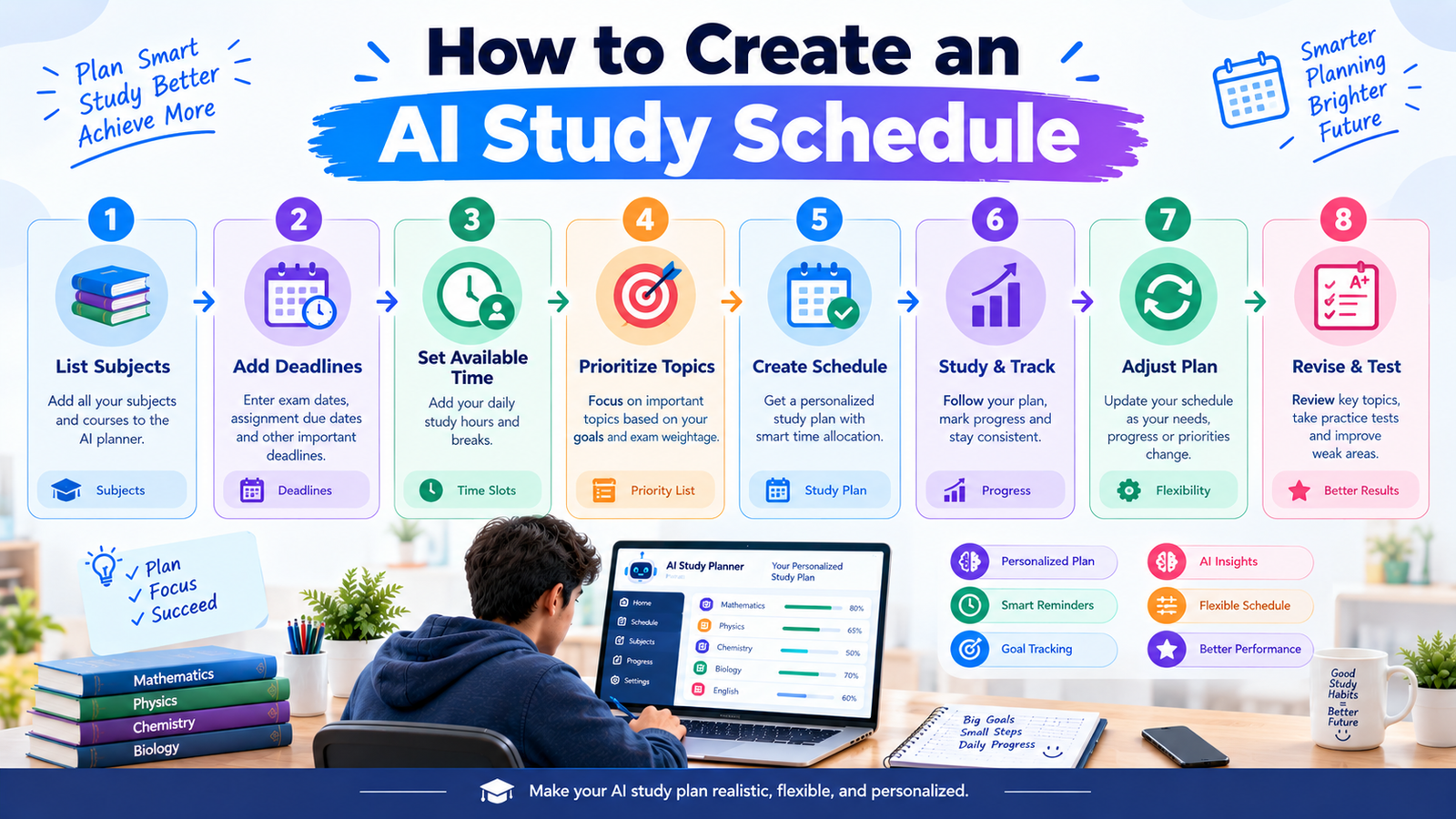
AI Study Planner Workflow
A simple AI-powered study planning process looks like this:
List Subjects → Add Deadlines → Estimate Available Time → Identify Difficult Topics → Create Schedule → Study → Track Progress → Analyze Weak Areas → Adjust Schedule → Revise → Take Mock Test
The schedule should be flexible.
If you finish a topic earlier than expected, move forward. If a topic takes longer, adjust the remaining tasks.
The purpose of a study schedule is to guide your study, not create unnecessary pressure.
How to Track Your Progress
Creating a schedule is only the beginning.
You should also track whether you are actually following it.
You can use a simple system:
Completed: Topic fully understood
Review: Needs additional revision
Practice: Needs more questions
Not Started: Still pending
For example:
| Topic | Status |
|---|---|
| Algebra | Completed |
| Calculus | Review |
| Statistics | Practice |
| Geometry | Not Started |
You can then give this information to AI and ask it to update your schedule.
How AI Can Help You Adjust Your Schedule
Your study plan should change as your progress changes.
For example, after a week you might discover that:
- Biology is easier than expected.
- Mathematics requires more practice.
- You are spending too much time making notes.
- You need more time for mock tests.
You can tell AI about these changes and ask for a revised plan.
For example:
“Update my study schedule. I finished biology early but need two additional sessions for mathematics. Keep my existing exam dates and include one additional mock test.”
This is one of the useful features of AI-based planning: you can quickly create a new version of your schedule when your situation changes.
Common Study Schedule Mistakes
1. Planning Too Many Hours
A schedule should be realistic.
2. Ignoring Breaks
Breaks should be part of your plan.
3. Studying Only Easy Subjects
Difficult topics often need more practice.
4. Forgetting Revision
Finishing a chapter once does not mean you never need to review it.
5. Not Practicing Questions
Reading alone is not enough for many exams.
6. Never Adjusting the Schedule
Your plan should change when your progress changes.
7. Depending Completely on AI
AI can organize your schedule, but you still need to decide what works for you.
How to Make Your AI Study Schedule More Effective
A useful schedule should have five characteristics:
Realistic
It should fit your actual available time.
Specific
Instead of saying “study science,” specify the chapter or task.
Flexible
Leave some room for unexpected delays.
Balanced
Include learning, revision, practice, and breaks.
Measurable
You should be able to tell whether you completed the task.
Instead of:
Study mathematics
Use:
Complete 15 algebra practice questions and review incorrect answers.
The second task is easier to measure.
Should You Let AI Create Your Entire Study Plan?
AI can create the initial structure, but you should review it.
Check:
- Are the study hours realistic?
- Are your hardest subjects getting enough time?
- Are the exam dates correct?
- Are revision sessions included?
- Are practice tests included?
- Are there enough breaks?
- Does the plan fit your daily routine?
If something doesn’t work, change it.
A personalized schedule created with your input is usually more useful than blindly following an automatically generated plan.
Benefits of an AI Study Planner
An AI study planner can help students:
- Organize multiple subjects
- Manage exam deadlines
- Break large tasks into smaller steps
- Create revision schedules
- Generate practice plans
- Identify weak areas
- Adjust schedules when plans change
- Reduce planning time
- Maintain a clearer study routine
The main benefit is not that AI magically makes studying easier. Its value comes from helping you organize your time and study more intentionally.
Limitations of AI Study Planners
AI-generated schedules also have limitations.
AI may not know:
- Your actual concentration level
- How quickly you learn
- Unexpected responsibilities
- Your exact course requirements
- Your teacher’s preferred exam format
- How much revision you personally need
An AI schedule can therefore be a useful starting point, but you should customize it.
Final Thoughts
An AI study planner can help students create a structured and personalized study schedule without spending too much time planning everything manually.
You can use AI to organize subjects, prioritize difficult topics, manage exam deadlines, create revision sessions, generate practice schedules, and adjust your plan when you fall behind.
The key is to avoid creating a schedule that looks perfect but is impossible to follow.
Start with your real available time, divide your syllabus into manageable tasks, include breaks and revision, practice regularly, and adjust the schedule based on your progress.
Most importantly, remember that AI can plan your study time, but you still have to do the learning. Used correctly, an AI study planner can help you become more organized, consistent, and prepared for your exams.
