
Assignments are an important part of student life. Whether you are in school, college, or university, you may regularly need to write essays, answer questions, prepare presentations, complete research projects, solve problems, or create reports.
These tasks can sometimes take a lot of time. Students may struggle to understand an assignment question, find relevant information, organize their ideas, or improve their final draft.
Artificial intelligence can help with many of these tasks.
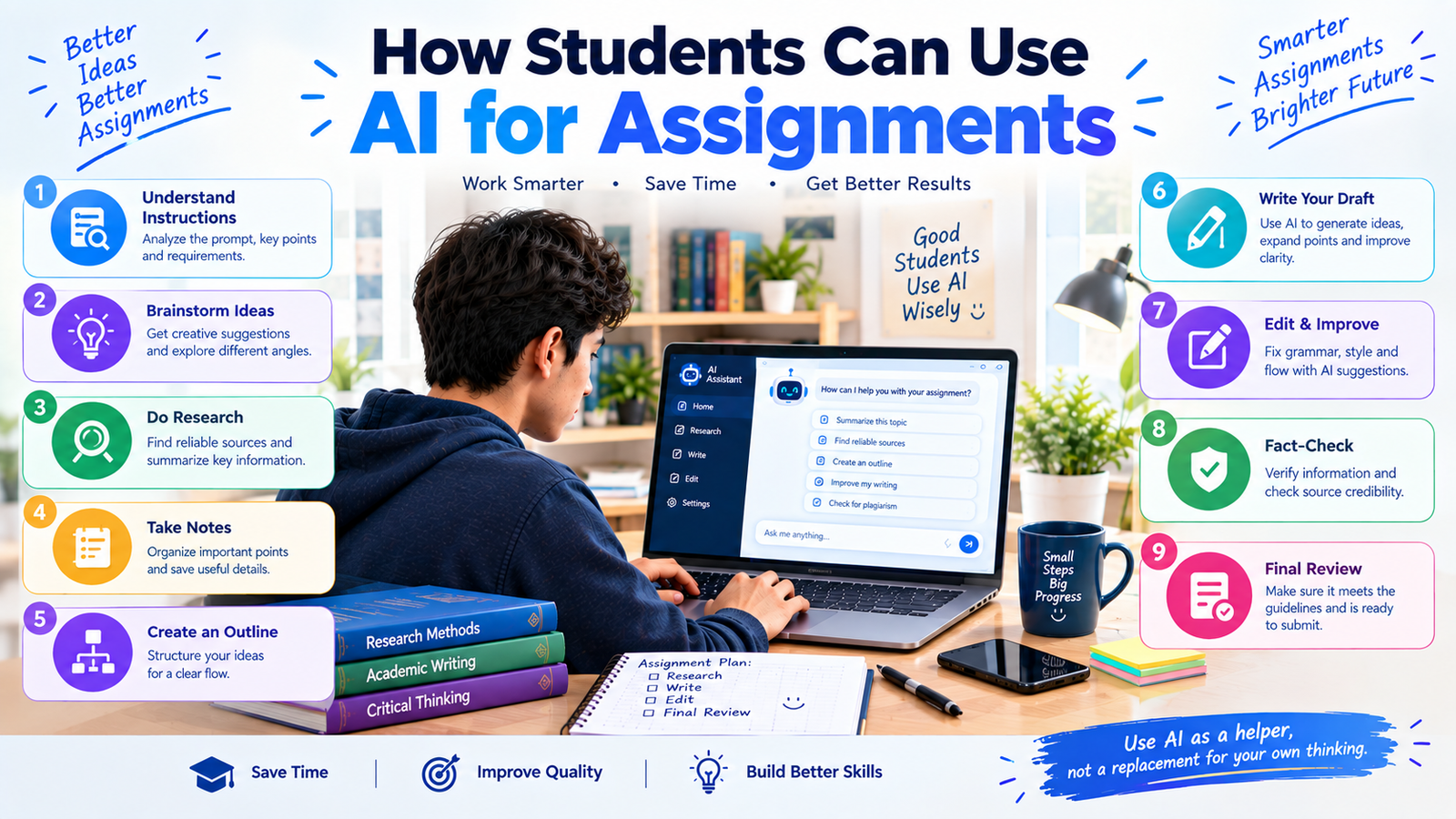
AI tools can act as a study assistant that helps students understand instructions, brainstorm ideas, research topics, create outlines, review drafts, explain difficult concepts, and improve writing.
However, there is an important difference between using AI to support an assignment and asking AI to complete the entire assignment for you.
Students should use AI to improve their learning and productivity while following their school’s or university’s rules about AI use.
In this guide, we will explain how students can use AI for assignments in a practical and responsible way.
What Can AI Do for Student Assignments?
AI can support students at different stages of an assignment.
Depending on the task, you can use AI to:
- Understand assignment instructions
- Brainstorm ideas
- Choose a topic
- Create research questions
- Find useful keywords
- Explain difficult concepts
- Organize notes
- Create an assignment outline
- Improve grammar
- Check clarity
- Generate practice questions
- Review your draft
- Identify missing points
- Prepare presentations
- Create study checklists
The key is to remain involved in the process.
AI should help you think, learn, organize, and improve, rather than simply produce work that you submit without understanding.
1. Understand the Assignment Instructions
Before starting an assignment, you need to understand exactly what your teacher or professor is asking you to do.
Assignment instructions can sometimes contain unfamiliar terms such as:
- Analyze
- Compare
- Evaluate
- Discuss
- Explain
- Critically examine
- Summarize
- Argue
AI can help explain these instructions.
For example, you could ask:
“Explain what this assignment question is asking me to do. Break the instructions into simple steps.”
You can then identify:
- What the topic is
- What type of response is required
- How many sources may be needed
- What format is expected
- How long the assignment should be
- What questions need to be answered
Always compare the AI’s explanation with the original instructions.
2. Brainstorm Assignment Ideas
Sometimes the hardest part is getting started.
If you have been given a broad topic, AI can help you brainstorm possible directions.
For example:
“Give me 10 possible angles for an assignment about the impact of social media on education.”
You might receive ideas involving:
- Student engagement
- Online learning
- Academic performance
- Communication
- Digital distraction
- Collaboration
- Privacy
- Mental workload
You don’t have to use the ideas exactly as AI provides them.
Use them as a starting point and choose an angle that fits your assignment.
3. Choose a Specific Topic
Broad topics can make assignments difficult.
For example:
Too broad:
“Artificial Intelligence”
More focused:
“How AI-powered study tools can support personalized learning for college students”
AI can help you narrow down a topic.
Try:
“Help me narrow this assignment topic into five specific research topics suitable for a college student.”
You should then consider which topic has enough reliable information available.
4. Create Research Questions
A good research question can give your assignment a clear direction.
For example, if your topic is AI in education, possible questions might include:
- How are students using AI study tools?
- How can AI personalize learning?
- What are the limitations of AI in education?
- How should students use AI responsibly?
You can ask AI:
“Create five focused research questions for an assignment about AI in education.”
This can help you decide what information you need to research.
5. Use AI to Generate Search Keywords
Finding information becomes easier when you use the right search terms.
Suppose your assignment is about online learning.
Instead of searching only for:
“Online learning”
you might use:
- online learning student engagement
- online education academic performance
- digital learning benefits students
- online learning challenges
- virtual classroom student participation
AI can help you generate additional search terms.
Try:
“Generate 20 academic search keywords for an assignment about online learning and student performance.”
You can use these keywords in your library database, academic search engine, or other reliable research sources.
6. Use AI to Understand Difficult Topics
Assignments sometimes require students to understand complicated theories, technical concepts, or academic terminology.
AI can explain these concepts at different levels.
For example:
“Explain this theory in simple language and then give me a real-world example.”
You can also ask:
“Explain this concept as if I am a first-year college student.”
If the first explanation is still difficult, ask follow-up questions.
This can help you develop your own understanding before writing the assignment.
7. Use AI to Organize Your Research Notes
After researching a topic, you may have information from several sources.
Your notes might become difficult to manage.
AI can help organize your own notes into categories.
For example:
“Organize these notes into themes. Keep the original meaning and do not add unsupported information.”
You might organize the notes into:
- Background
- Main arguments
- Evidence
- Examples
- Benefits
- Challenges
- Different viewpoints
- Conclusion
This makes it easier to see how your research fits together.
8. Create an Assignment Outline
An outline can make writing much easier.
Instead of starting with a blank document, create a basic structure first.
For example:
Introduction
- Background
- Main topic
- Thesis or central idea
Main Section 1
Key argument
- Supporting evidence
- Example
Main Section 2
- Second argument
- Evidence
- Example
Main Section 3
- Alternative perspective
- Evidence
- Discussion
Conclusion
- Main findings
- Final point
You can ask AI:
“Create an outline for my assignment based on this question and my research notes. Do not write the assignment.”
This keeps you in control of the actual writing.
9. Use AI to Improve Your Draft
Once you have written your assignment, AI can help review your work.
For example:
“Check this paragraph for grammar, clarity, and sentence structure. Keep my original meaning.”
You can also ask:
“Identify sentences that are unclear and explain why they may be confusing.”
This can help you become a better writer.
Instead of asking AI to completely rewrite everything, consider using it as an editor.
10. Improve Grammar and Spelling
Grammar mistakes can distract readers from your ideas.
AI writing assistants can help identify:
- Spelling errors
- Grammar problems
- Punctuation issues
- Awkward wording
- Repeated words
- Unclear sentences
For example:
“Check this paragraph for grammar and spelling mistakes. Show me the problems and explain the corrections.”
This approach can help you understand your mistakes rather than simply accepting an edited version.
11. Use AI to Check Assignment Structure
A well-written assignment should have a logical flow.
After completing your draft, you can ask AI:
“Review the structure of this assignment. Identify areas where the argument or explanation may not flow logically.”
AI may point out that:
- An important idea needs more explanation
- Two sections repeat the same point
- A paragraph doesn’t clearly support the main argument
- The conclusion introduces a new idea
- Evidence is missing from a claim
You should then decide whether those suggestions are appropriate.
12. Use AI for Presentation Assignments
AI can also help students prepare presentations.
For example, if you have to give a presentation about climate change, you can ask:
“Create a presentation outline about climate change with 10 slides. Give each slide a short title and three key points.”
You can then develop the slides yourself.
AI can also help you create:
- Presentation outlines
- Speaker notes
- Discussion questions
- Presentation checklists
- Possible audience questions
You should verify any factual claims before including them in your presentation.
13. Use AI to Practice Before Submitting
Before submitting your assignment, AI can act as a reviewer.
For example:
“Review this assignment against the following requirements. Identify which requirements I have addressed and which ones may need more work.”
You can provide your assignment requirements and compare the results with your own review.
You can also ask:
“Give me five questions a teacher might ask me about this assignment.”
Then try answering those questions yourself.
This is especially useful for presentations, research projects, and oral assessments.
14. Use AI to Identify Missing Information
Sometimes students complete an assignment but realize later that they forgot an important part of the question.
AI can help you review your work.
Try:
“Compare my assignment with the original question. Identify any parts of the question that I have not fully addressed.”
This can help you notice gaps.
However, you should make the final judgment yourself because AI may misunderstand the assignment requirements.
15. Use AI to Create a Final Checklist
A final checklist can help you avoid simple mistakes.
You can ask AI to create a checklist based on your assignment requirements.
A basic checklist might include:
- Assignment question answered
- Introduction completed
- Main argument explained
- Evidence included
- Sources checked
- Citations added
- Grammar reviewed
- Formatting checked
- Word count checked
- Conclusion completed
- Instructions followed
Checking these details before submission can prevent avoidable errors.
Useful AI Prompts for Student Assignments
Here are some prompts students can use.
Understanding the Question
“Explain this assignment question in simple language and tell me what I need to address.”
Brainstorming
“Give me 10 possible ideas for an assignment about [topic].”
Research
“Suggest academic search keywords for researching [topic].”
Outline
“Create an outline for this assignment based on the question and my research notes. Do not write the assignment.”
Explanation
“Explain [concept] in simple language and give me two examples.”
Organization
“Organize these research notes into logical sections without changing their meaning.”
Editing
“Check this paragraph for grammar, clarity, and sentence structure while keeping my original ideas.”
Review
“Review my assignment against these requirements and identify areas that may need improvement.”
Presentation
“Create a 10-slide presentation outline about [topic] with key points for each slide.”
Final Check
“Create a submission checklist based on these assignment requirements.”
How Students Can Use AI Without Cheating
One of the biggest questions students have is whether using AI for assignments is allowed.
The answer depends on your school’s, college’s, or university’s rules.
Some institutions may allow AI for brainstorming, studying, or proofreading. Others may have stricter requirements.
Before using AI, check:
- Your course instructions
- Your teacher’s guidance
- Your institution’s AI policy
- Assignment-specific requirements
If your instructor says that AI-generated writing is not allowed, don’t submit AI-generated content as your own.
A safer approach, when permitted, is to use AI for learning support, brainstorming, research organization, feedback, and revision while writing the final assignment yourself.
Don’t Ask AI to Write Everything
It can be tempting to enter an assignment question into an AI tool and copy the response.
This approach can create several problems.
The AI may:
- Misunderstand the question
- Include incorrect information
- Use weak arguments
- Produce generic writing
- Include unsupported claims
- Generate inaccurate citations
- Fail to match your teacher’s requirements
More importantly, you may submit work you don’t fully understand.
Instead, use AI throughout the process while keeping your own thinking at the center.
Always Verify AI-Generated Information
AI tools can sometimes provide inaccurate information.
This is particularly important when working on academic assignments.
Before using a factual claim, check:
- The original source
- Author
- Publication date
- Statistics
- Research findings
- Quotes
- References
- Context
If AI provides a citation, don’t automatically assume it exists.
Find the original source and confirm that it actually supports the claim.
Don’t Use AI to Create Fake References
Students should never ask AI to invent academic sources.
For example, don’t use a prompt such as:
“Create five fake research papers that support my argument.”
Instead, use AI to help identify what kinds of sources you need, and then find real sources through trusted academic databases, libraries, journals, and publications.
Always verify sources before including them in your assignment.
Keep Your Own Voice
Your assignment should reflect your own understanding and ideas.
AI-generated writing can sometimes sound generic or overly formal.
If you use AI for editing, make sure the final version still sounds natural and accurately represents what you understand.
A useful prompt is:
“Improve the grammar and clarity of this paragraph but preserve my writing style and original meaning.”
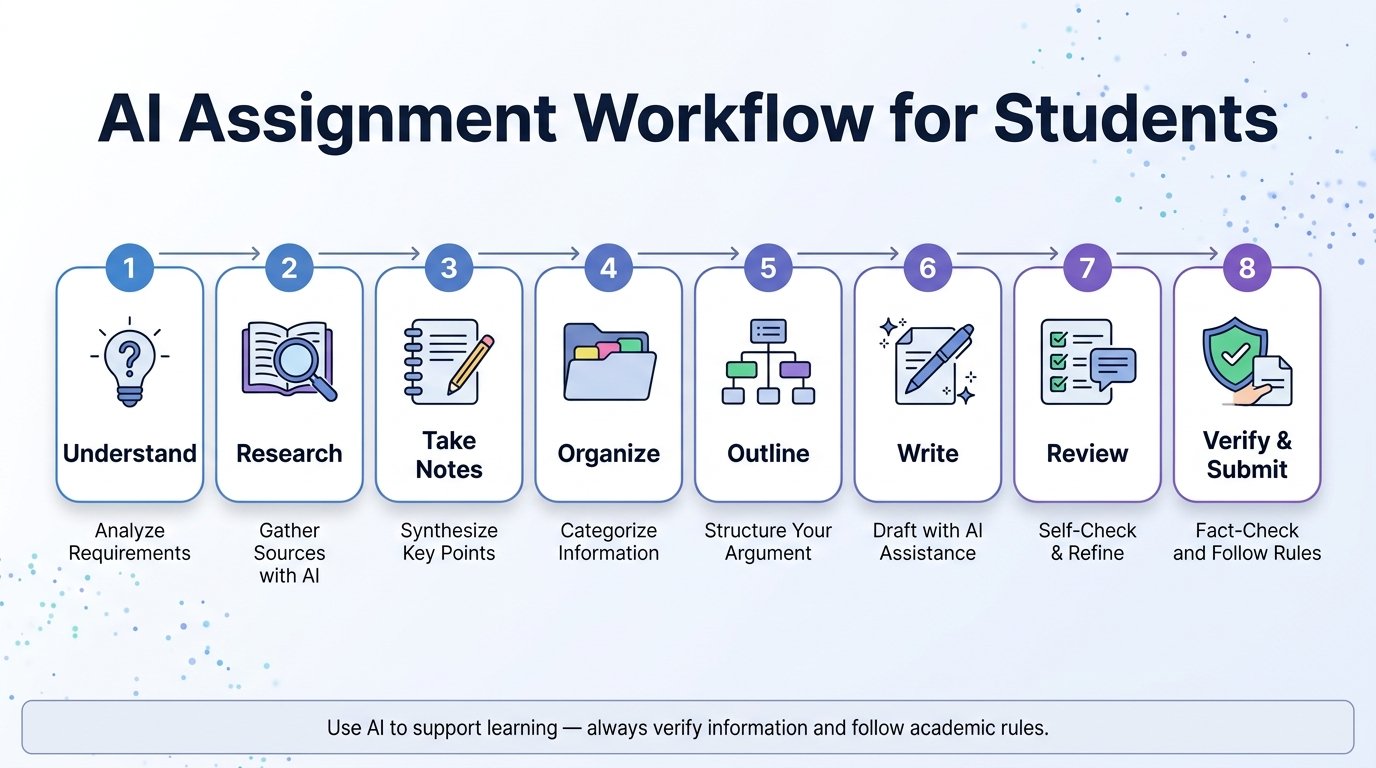
AI Assignment Workflow for Students
A practical AI-assisted assignment workflow can look like this:
Understand the Question → Choose a Topic → Research → Take Notes → Organize Ideas → Create Outline → Write Draft → Review With AI → Verify Information → Edit → Final Check → Submit
This workflow keeps the student involved at every stage.
AI can provide assistance, but the student remains responsible for the final assignment.
Benefits of Using AI for Assignments
When used responsibly, AI can provide several benefits.
Saves Time
AI can speed up brainstorming, organization, and proofreading.
Improves Understanding
Students can ask for explanations in simpler language.
Helps With Organization
Research notes and ideas can be structured more clearly.
Supports Better Writing
AI can identify grammar and clarity problems.
Encourages Revision
Students can receive feedback before submitting their work.
Helps With Planning
AI can break large assignments into smaller tasks.
Limitations of AI for Assignments
AI also has limitations.
It Can Make Mistakes
AI-generated information may be incorrect.
It May Misunderstand Instructions
An AI tool does not always understand the context of your course.
It Can Produce Generic Answers
Generic responses may not meet the requirements of your assignment.
Citations May Be Inaccurate
AI-generated references should always be checked.
Overuse Can Reduce Learning
If students allow AI to do all the thinking, they may miss the learning opportunity.
Tips for Using AI More Effectively
To get better results from AI, provide useful context.
Instead of:
“Help me with my assignment.”
Try:
“I am a college student taking an introductory economics course. My assignment asks me to explain how inflation affects household spending. I need to write 1,000 words and use academic sources. Help me create a research plan and outline. Do not write the assignment for me.”
The second prompt gives AI much more useful information.
You can also provide:
- Your education level
- Assignment question
- Word count
- Deadline
- Required format
- Research requirements
- Your existing notes
- Areas you don’t understand
Final Thoughts
AI can be a powerful assistant for students when it is used correctly.
>Students can use AI to understand assignment instructions, brainstorm ideas, develop research questions, organize notes, create outlines, explain difficult concepts, improve writing, review drafts, and prepare presentations.
>But AI should not replace your own learning.
>The most effective approach is to use AI as a learning and productivity assistant while keeping yourself responsible for research, critical thinking, fact-checking, writing, and the final submission.
>Before using AI for any assignment, always check your school’s or university’s rules. When AI use is permitted, use it to make your work more organized and your learning more effective—not simply to avoid doing the work yourself.
