
Studying has changed significantly with the growth of artificial intelligence. Students can now use AI-powered tools to understand difficult topics, create practice questions, organize notes, prepare for exams, and improve their study routines.
But with so many AI tools available, choosing the right study tools can be confusing.
The good news is that you don’t need dozens of applications. A few useful AI study tools can help with most common academic tasks, from understanding lessons and creating flashcards to researching topics and organizing assignments.
In this guide, we’ll explore the best AI study tools for students in 206,
what each tool can help you with, and how to use AI without becoming dependent on it.
What Are AI Study Tools?6,
AI study tools are applications that use artificial intelligence to support different parts of the learning process.
Depending on the tool, students can use AI to:
- Understand difficult concepts
- Summarize notes
- Create flashcards
- Generate quizzes
- Practice questions
- Build study plans
- Improve writing
- Research topics
- Organize information
- Prepare for exams
- Review mistakes
The most useful approach is to treat AI as a study assistant, not as a replacement for your own thinking.
Best AI Study Tools for Students
Here are 15 AI-powered tools and tool categories that students can consider for different study needs.
1. ChatGPT
ChatGPT can work as a general-purpose AI study assistant.
Students can use it to:
- Explain difficult topics
- Create study plans
- Generate practice questions
- Create flashcards
- Review notes
- Practice languages
- Explain mistakes
- Brainstorm ideas
One particularly useful approach is to ask ChatGPT to guide you through a problem instead of immediately giving you the answer.
ChatGPT’s Study Mode is specifically designed around guided learning, including questions, step-by-step explanations, knowledge checks, and practice.
For example, you can say:
“Teach me this topic step by step. Ask me questions before giving me the answer.”
This encourages active participation.
2. Google Gemini
Google Gemini can help students with explanations, brainstorming, writing, and general study questions.
>You can use an AI assistant like Gemini to break complicated topics into smaller sections and ask follow-up questions when something is unclear.
>For academic work, however, always verify important information using textbooks, class materials, or reliable sources.
3. Microsoft Copilot
Microsoft Copilot can be useful for students who already use Microsoft’s productivity tools.
Depending on the available features, AI assistance can help with:
- Writing
- Brainstorming
- Information organization
- Documents
- Presentations
- Productivity
Using AI within tools you already use can reduce the need to move between multiple applications.
4. Quizlet
Quizlet is useful for students who prefer flashcards and practice-based learning.
Students can use it for:
- Vocabulary
- Definitions
- Important facts
- Language learning
- Exam revision
AI-powered study features can help turn learning material into interactive study activities.
Flashcards can be especially useful for subjects that require remembering terminology, formulas, dates, or concepts.
5. Grammarly
Grammarly can help students review their writing.
It can identify potential issues involving:
- Grammar
- Spelling
- Clarity
- Sentence structure
- Word choice
- Tone
Students can use it when reviewing essays, reports, emails, and other written work.
However, don’t simply accept every suggestion. Understanding why a sentence is being changed can help improve your writing skills.
6. Perplexity
Perplexity can be useful when exploring a research topic.
It can help students:
- Explore unfamiliar topics
- Find information
- Identify potential sources
- Ask follow-up questions
- Understand background concepts
When using AI for academic research, don’t rely only on the generated answer.
Open the original sources and evaluate them yourself.
7. Notion AI
Notion AI can help students organize their academic information.
You can use it to manage:
- Class notes
- Assignment lists
- Study plans
- Project ideas
- Research notes
- To-do lists
For students who already use Notion, AI features can help organize information and create a more structured study workspace.
8. Wolfram|Alpha
Wolfram|Alpha can be useful for mathematical and computational learning.
Students may use it for areas such as:
- Algebra
- Calculus
- Statistics
- Physics
- Engineering
- Scientific calculations
Instead of simply copying the result, try solving the problem yourself first.
Then use the tool to check your calculation or investigate the steps.
9. Elicit
Elicit is designed around academic research.
It can help students explore research questions and find relevant academic literature.
This can be useful for:
- Research projects
- Literature reviews
- Academic papers
- Research questions
AI research tools should be used as a starting point. Students should still read original papers and evaluate the evidence themselves.
10. QuillBot
QuillBot offers writing and paraphrasing features that students may find useful when reviewing their own writing.
Potential uses include:
- Exploring alternative wording
- Improving sentence structure
- Summarizing information
- Reviewing drafts
Students should never use paraphrasing tools to disguise copied material or bypass academic integrity rules.
11. DeepL
DeepL can help students with translation and language learning.
Students learning another language can use it to:
- Understand unfamiliar sentences
- Compare translations
- Explore vocabulary
- Review written language
For learning purposes, try to understand why a sentence is translated in a particular way instead of simply copying the translation.
12. Otter.ai
AI transcription tools such as Otter.ai can help convert spoken content into text.
Depending on your school’s rules and the situation, this can potentially help with:
- Lecture notes
- Study discussions
- Interviews
- Meetings
- Review sessions
Always make sure recording or transcribing a class or another person is permitted before doing so.
13. Canva AI
Canva’s AI-powered features can help students create visual learning materials.
You can use design tools to create:
- Study diagrams
- Infographics
- Presentations
- Posters
- Visual summaries
- Educational graphics
Visualizing information can be useful when studying topics that are easier to understand through diagrams or structured layouts.
14. AI Presentation Tools
AI presentation tools can help students create an initial structure for presentations.
They may assist with:
- Slide organization
- Presentation outlines
- Visual ideas
- Content structure
- Design suggestions
Always review the generated presentation before using it.
Check the facts, remove unnecessary information, and make sure the final presentation reflects your own understanding.
15. AI Flashcard and Quiz Tools
AI-powered flashcard and quiz tools can help students turn study material into active practice.
You can use them to create:
- Multiple-choice questions
- Short-answer questions
- Flashcards
- True-or-false questions
- Topic quizzes
For example, after studying a chapter, ask an AI tool to create 20 questions without showing the answers.
Then answer them yourself.
This is often more useful for learning than simply reading the chapter again.
How to Choose the Best AI Study Tool
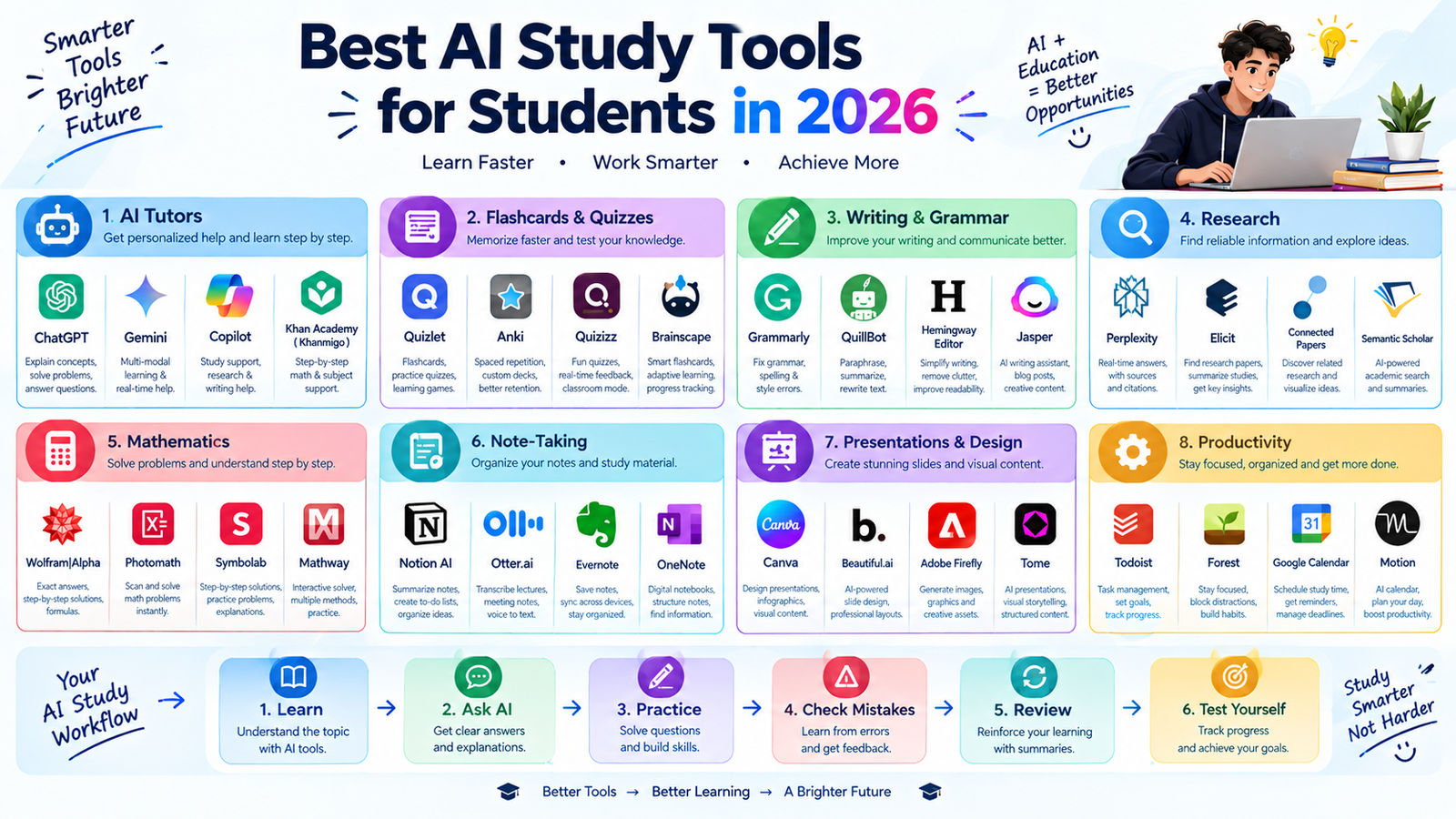
There is no single AI study tool that is perfect for every student. The best choice depends on your subject, learning style, and specific study problem.
Before choosing a tool, ask yourself what you actually need help with.
For understanding difficult topics: Use an AI tutor or general AI assistant.
>For memorization: Try flashcard and quiz tools.
>For writing: Use grammar and writing assistants.
>For research: Use academic research tools and verify original sources.
>For mathematics: Use computational tools to check calculations and understand solutions.
>For organization: Use AI-powered note-taking and productivity tools.
>For presentations: Use AI design and presentation tools.
The goal is not to use the most AI tools. The goal is to use the right tools for your learning needs.
How to Use AI Study Tools Effectively
Simply having access to AI doesn’t automatically make studying better.
The way you use the tool matters.
A useful study process is:
<strong>Learn → Ask → Practice → Check → Review → Test</strong>
First, study the material yourself.
Then ask AI to explain anything you don’t understand.
<p>After that, practice without looking at the answer.
Use AI to identify mistakes and explain difficult areas.
Finally, test yourself without AI assistance.
This turns AI into part of an active learning process.</p>
Use AI as a Tutor, Not a Shortcut
One of the biggest mistakes students can make is using AI only to get quick answers.
For example, instead of asking:
“Solve this problem.”
</blockquote>Try:
“Guide me through this problem step by step. Give me hi
nts and let me try each step before showing the solution.”
This approach can help you understand the process rather than memorizing the final answer.
lass=”yoast-text-mark” />>Study-focused AI features can also use questions, hints, explanations, and knowledge checks to encourage deeper learning.
Create Better Study Prompts
The quality of your AI response often depends on the quality of your prompt.
Include information such as:
- Your education level
- Subject
- Topic
- <p>What you already understand
- What you find difficult
- What you want to achieve</li>
- Pref
- erred explanation style
For example:
“I’m a first-year college student studying biology. Explain cellular respiration in simple language, give me a real-world analogy, and then test me with five questions.”</p></blockquote>
This gives the AI
much more useful context.
Use AI to Create a Personalized Study Plan
AI can also help you organize your study schedule.
Give it information such as:
- Exam date
- Subjects
- Available study time</li>
- Difficult chapters
- Completed topics
<l
i>Revisio
n time
Then ask it to create a realistic schedule.
For example:
“I have 10 days before my biology exam. I can study two hours each evening. Create a revision plan that includes learning, practice questions, and final review.”
</blockquote>You should then adjust the plan based on your actual schedule and priorities.
Use AI to Turn Notes Into Practice Material
One of the most useful study workflows is converting your notes into active practice.
For example:
<strong>Your notes → Summary → Flashcards → Quiz → Mistake Review
You can ask AI to identify the key concepts in your notes and turn them into questions.
Then try answering the questions without looking at the original material.
This can make revision more interactive.
Don’t Trust Every AI Answer
AI tools can make mistakes.
An answer may sound confident while still containing incorrect information.
This is why students should verify important academic information.
Check:
- <p>Textbooks
- Lecture materials
- Academic papers
<
li>Reliable educational websites
- Official sources
This is particularly important when using AI for research, scientific information, statistics, or assignments.
Don’t Use AI to Cheat
<p>AI study tools should support learning, not replace your own academic work.</p>Before using AI for an assignment, check your school’s or university’s policy.
Different instructors and institutions may have different rules about AI-generated or AI-assisted work.
For graded work, follow the applicable academic requirements.
Protect Your Personal Information
Students should also think about privacy when using AI tools.
Avoid sharing unnecessary:
- Passwords
- Personal identification information
- Private academic records
- Confidential documents
- Other people’s private information
</ul>
If you’re uploading notes, assignments, or documents, make sure you understand what information they contain and whether you’re permitted to share it with the tool.
Best AI Study Tools by Purpose
Study Need Useful Tool Type Understanding concepts AI tutor Exam preparation Quiz and practice tools Memorization Flashcards Writing Grammar and writing tools Research Academic research tools Mathematics Computational tools Notes AI note-taking tools Presentations AI design tools Language learning Translation and language tools Organization AI productivity tools A Simple AI-Powered Study Routine
You can create a simple routine using AI without making it the center of your entire study process.
Step 1: Study the Material
Start with your textbook, lecture, notes, or other reliable learning material.
Step 2: Identify Difficult Areas
Write down the concepts you don’t understand.
Step 3: Ask AI for Help
Ask for simple explanations, examples, or step-by-step guidance.
<h3>Step 4: Practice
Generate questions or exercises and solve them yourself.
Step 5: Review Mistakes
Ask AI to explain why your answer was incorrect.
Step 6: Test Yourself
Take a final quiz without looking at your notes or using AI.
Step 7: Review Again
Return to the topics where you struggled.
This approach keeps you actively involved in your education.
Common Mistakes Students Make With AI Study Tools
Using Too Many Tools
You don’t need a separate AI application for every task.
Start with a few tools and learn how to use them well.
Copying Answers
Copying an AI response may save time, but it doesn’t necessarily improve your understanding.
Skipping Original Sources
AI-generated summaries should not replace textbooks, research papers, or official learning materials.
Using AI for Everything
Keep some study activities completely independent of AI so you can test what you actually know.
Ignoring Academic Policies
Always follow your school’s or university’s rules regarding AI.
Final Thoughts
The best AI study tools for students are the ones that help you learn more effectively without replacing your own thinking.
AI can help explain difficult concepts, create quizzes, organize notes, generate flashcards, support research, improve writing, and build study plans.
But the most important part of studying is still your own effort.
<p>Use AI to ask better questions, practice more, identify mistakes, and understand difficult concepts.Start with one or two tools that match your needs instead of trying to use every
thing at once.When used responsibly, AI can become a useful part of a modern student’s study routine while keeping learning, critical thinking, and independent work at the center.
