

Writing an essay can be challenging for students, especially when they have to choose a topic, organize their ideas, conduct research, create an outline, write multiple paragraphs, and check their final draft.
AI writing tools can help students with many parts of this process. They can help brainstorm ideas, create outlines, improve grammar, suggest clearer wording, summarize research material, and provide feedback on drafts.
However, AI should not replace a student’s own ideas and critical thinking. The best approach is to use AI as a writing assistant while keeping the research, reasoning, and final academic work under the student’s control.
In this guide, we will explore the best AI tools students can use for essay writing and explain how to use them responsibly.
Why Students Use AI for Essay Writing
Writing an academic essay usually involves several steps.
Students need to:
- Understand the assignment
- Choose or analyze a topic
- Research information
- Develop an argument
- Create an outline
- Write the first draft
- Improve grammar and clarity
- Add citations
- Proofread the final version
AI tools can assist with some of these tasks.
For example, a student who has a general topic but does not know how to organize it can ask an AI tool:
“Create an essay outline about the impact of social media on college students. Include an introduction, three main arguments, counterargument, and conclusion.”
The student can then use the outline as a starting point and develop the actual ideas independently.
1. ChatGPT for Essay Brainstorming and Writing Support
ChatGPT can be useful throughout different stages of the essay-writing process.
Students can use it to brainstorm topics, develop research questions, create outlines, explain difficult concepts, review drafts, and suggest improvements.
For example:
“Give me five possible arguments for an essay about renewable energy. Explain the strengths and weaknesses of each argument.”
Students can also submit their own paragraph and ask:
“Review this paragraph for clarity and logical flow. Do not rewrite it completely.”
This type of prompt encourages the student to improve their own writing.
Best for:
- Brainstorming
- Essay outlines
- Understanding topics
- Draft feedback
- Revision
- Grammar and clarity
Students should fact-check important claims and avoid submitting AI-generated work as their own when their institution does not permit it.
2. Grammarly for Grammar and Writing Improvement
Grammarly is a popular writing assistant that can help students identify grammar, spelling, punctuation, clarity, and style issues.
After writing an essay, students can use a writing assistant to review their draft.
For example, it can help identify sentences that are difficult to understand or areas where wording could be clearer.
Best for:
- Grammar
- Spelling
- Punctuation
- Clarity
- Sentence improvement
- Proofreading
It is generally more useful to write the first draft yourself and then use the tool for feedback rather than allowing it to generate the entire essay.
3. QuillBot for Paraphrasing and Editing
QuillBot provides writing and paraphrasing features that can help students explore different ways of expressing their own ideas.
For example, a student may have written a sentence that sounds repetitive and want to find a clearer way to express the same idea.
AI paraphrasing should be used carefully. Students still need to understand the source material and properly cite information taken from other sources.
Best for:
- Paraphrasing
- Rewording
- Summarization
- Vocabulary improvement
- Editing
Students should never use paraphrasing tools simply to disguise copied material.
4. Google Gemini for Brainstorming and Research Support
Google Gemini can help students brainstorm essay ideas, understand topics, generate questions, and organize information.
For example:
“Help me develop three research questions for an essay about artificial intelligence in education.”
Students can use these questions to guide their research.
AI-generated information should be checked against reliable sources before being included in an academic essay.
Best for:
- Brainstorming
- Topic exploration
- Research questions
- Explanations
- Essay planning
5. Microsoft Copilot for Writing and Documents
Microsoft Copilot can be useful for students who work with Microsoft productivity applications.
It can assist with brainstorming, drafting, summarizing, and working with documents, depending on the version and features available to the user.
Students can use AI assistance to organize their ideas before developing their own essay.
Best for:
- Document work
- Brainstorming
- Draft organization
- Summaries
- Writing assistance
Students should always review and personalize AI-assisted content.
6. Perplexity for Essay Research
Research is one of the most important parts of academic essay writing.
Perplexity can help students explore questions and discover sources related to a topic.
For example:
“What are the major arguments for and against using AI in education? Provide sources for further reading.”
This can help students identify areas they may want to investigate.
However, students should read the original sources rather than relying only on an AI-generated summary.
Best for:
- Research
- Topic exploration
- Finding sources
- Background information
- Research questions
7. Elicit for Academic Research
Students working on research-heavy essays may need to find and compare academic papers.
Elicit is designed to assist with academic research workflows and can help students explore research literature.
It may be particularly useful for essays that require academic sources and literature reviews.
Best for:
- Academic research
- Research papers
- Literature reviews
- Finding relevant studies
- Comparing research
Students should evaluate the original papers and follow their instructor’s citation requirements.
8. Notion AI for Organizing Essay Ideas
Writing an essay becomes easier when ideas are organized before drafting.
Notion AI can assist students with organizing notes, structuring ideas, summarizing their own material, and creating outlines.
A student could create separate sections for:
- Introduction
- Main argument
- Supporting evidence
- Counterargument
- Conclusion
- Sources
This can make a large writing project easier to manage.
Best for:
- Essay organization
- Notes
- Outlines
- Research organization
- Project planning
9. LanguageTool for Proofreading
LanguageTool can help students check grammar, spelling, punctuation, and writing style.
It can be useful during the final proofreading stage.
Students can write their essay first and then review the suggestions provided by the tool.
Best for:
- Grammar checking
- Proofreading
- Spelling
- Punctuation
- Writing style
Students should decide whether each suggestion actually improves the meaning of their sentence.
10. Canva for Essay Presentations and Visual Projects
Some college assignments require students to turn written research into presentations, posters, or visual projects.
Canva can help students create visual materials based on their own research.
>For example, a student writing an essay about climate change could turn key findings into an educational infographic or presentation.
Best for:
- Presentations
- Infographics
- Posters
- Visual assignments
- Educational graphics
The facts and research used in the design should come from reliable sources.
How AI Can Help With Different Essay-Writing Stages
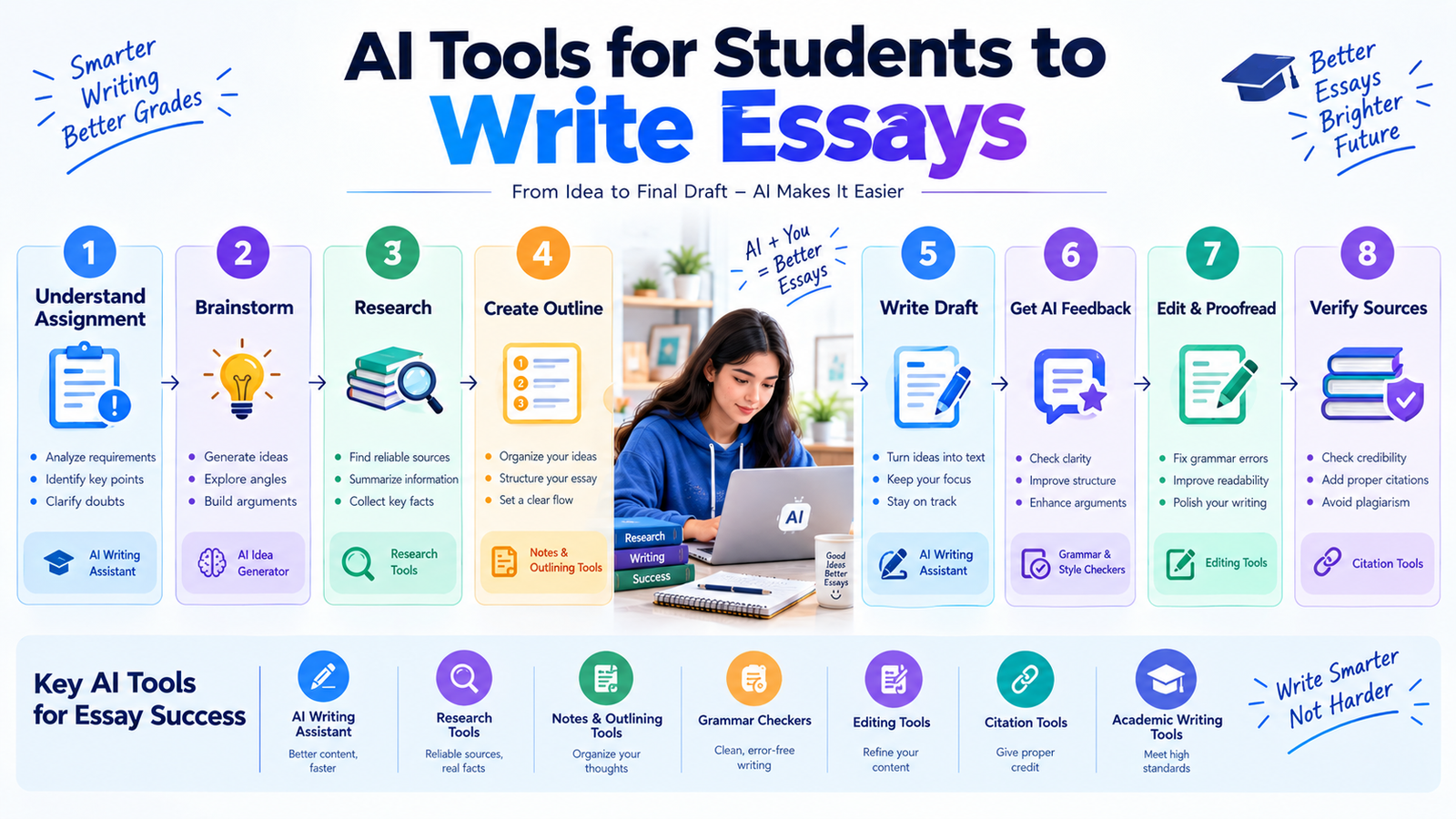
AI can be useful at different points in the writing process.
Stage 1: Understand the Assignment
Ask AI to explain the assignment requirements in simple language.
Stage 2: Brainstorm Ideas
Generate possible arguments, questions, and perspectives.
Stage 3: Research
Use research tools to identify useful sources and topics to investigate.
Stage 4: Create an Outline
Organize your own ideas into an introduction, body sections, and conclusion.
Stage 5: Write the Draft
Write the essay using your own reasoning, evidence, and understanding.
Stage 6: Get Feedback
Ask AI to identify unclear sentences, weak arguments, repetition, or structural problems.
Stage 7: Proofread
Use writing tools to check grammar, spelling, punctuation, and clarity.
Stage 8: Verify Sources
Check every important claim, quotation, citation, and reference.
This workflow keeps the student involved rather than allowing AI to produce an entire assignment.
Useful AI Prompts for Essay Writing
The right prompt can make AI much more useful.
For Topic Ideas
“Give me 10 essay topic ideas about artificial intelligence in education.”
>For Research Questions
“Create five research questions for an essay about social media and student productivity.”
>For an Outline
“Create a detailed essay outline for this topic. Include an introduction, three main points, counterargument, and conclusion.”
For Argument Development
“Help me identify possible arguments and counterarguments for my essay topic.”
For Writing Feedback
“Review my paragraph and identify problems with clarity, structure, and logical flow. Do not rewrite it completely.”
>For Grammar
“Check this paragraph for grammar, spelling, and punctuation mistakes.”
>For Revision
“Suggest ways to make this paragraph more concise while keeping my original meaning.”
>These prompts focus on learning and improving rather than simply generating a finished essay.
How to Use AI Without Losing Your Own Writing Skills
One of the biggest risks of AI essay tools is becoming dependent on them.
If students ask AI to write every introduction, paragraph, and conclusion, they may not develop their own writing abilities.
A better approach is:
Think → Research → Outline → Write → Review → Improve
Start with your own ideas.
Use AI to identify weaknesses.
Then make the changes yourself.
This approach allows students to benefit from AI while continuing to develop important academic writing skills.
AI Essay Writing Mistakes Students Should Avoid
1. Copying an Entire AI-Generated Essay
An AI-generated essay may not reflect your own understanding or meet your instructor’s requirements.
2. Trusting AI-Generated Facts
AI can sometimes produce inaccurate information or incorrect references.
Always verify important claims.
3. Using Fake Citations
Never assume that a citation provided by an AI tool is real. Check the original source.
4. Ignoring Academic Integrity Rules
Different schools, colleges, and universities may have different policies regarding AI-assisted writing.
5. Removing Your Own Voice
Academic writing should reflect your understanding, reasoning, and perspective.
How to Make AI-Assisted Essays Better
If AI is allowed for your assignment, you can use it as an editor and learning assistant.
Start by creating your own outline.
Then write your draft.
After that, ask AI to identify areas that need improvement.
For example:
“Review my essay and identify three areas where my argument could be stronger. Explain why, but do not rewrite the essay.”
This gives you useful feedback while keeping you responsible for the actual writing.
You can then revise the essay yourself.
Benefits of AI Tools for Essay Writing
AI writing tools can provide several useful benefits when used responsibly.
Faster Brainstorming
Students can quickly explore different ideas and possible arguments.
Better Organization
AI can help turn scattered ideas into a logical outline.
Writing Feedback
Students can identify grammar, clarity, and structure problems.
Research Support
Research-focused tools can help students discover relevant material.
Easier Revision
AI can identify repetitive or unclear sections that students can improve.
Learning Support
Students can ask questions about writing techniques, essay structure, and academic concepts.
Limitations of AI Essay Tools
AI tools are not perfect.
They may produce inaccurate information, misunderstand instructions, provide weak arguments, or suggest inappropriate wording.
They also cannot replace the student’s understanding of the assignment.
For academic writing, students should always verify information against reliable sources and review every part of an AI-assisted draft.
The student’s own reasoning should remain central to the essay.
Final Thoughts
The best AI tools for students to write essays can help with brainstorming, research, outlining, grammar, editing, organization, and revision.
>Tools such as ChatGPT, Grammarly, QuillBot, Gemini, Perplexity, Elicit, Notion AI, and LanguageTool can support different stages of the writing process.
>But the goal should not be to let AI write everything.
A better approach is to use AI as a study partner and writing assistant:
Research → Think → Outline → Write → Check → Improve.
>When students remain actively involved in the writing process, AI can save time, provide useful feedback, and help them develop stronger academic writing habits while maintaining their own ideas and skills.
